Jango's Debug Menu 1.0


![pyloader (Python scripts for GTA V) [Enhanced and Legacy]](https://img.gta5-mods.com/q75-w500-h333-cfill/images/pyloader-python-scripts-for-gta-v-enhanced/dffaa6-pyloader_new_miniature.png "pyloader (Python scripts for GTA V) [Enhanced and Legacy]")


27
0
27
0
Jango's Debug Menu
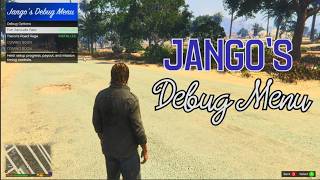
Jango’s Debug Menu lets you customize and debug my GTA V mods through one convenient LemonUI menu.
The menu automatically detects supported Jango mods you have installed and only displays options for those mods. You can adjust gameplay values, manage heist progress, change payouts, test features, and restore default settings without manually editing configuration files.
Currently Supported Mods
Trevor’s Road Rage and Fort Zancudo Raid.
More of my mods will be supported in future Updates.
Controls
Press F6 to open or close the menu.
The opening key can be changed in the Settings menu
Requirements
Grand Theft Auto V Legacy, Script Hook V, ScriptHookVDotNet 3, and LemonUI SHVDN3.
Installation
Install Script Hook V, ScriptHookVDotNet 3, and LemonUI SHVDN3 first.
Extract JangosDebugMenu.zip into your Grand Theft Auto V scripts folder. Create a "scripts" folder if you haven't already
The menu automatically detects supported my mods installed in the same folder.
VERY IMPORTANT: Make sure you download the LATEST VERSIONS of each mod the Debug Menu can modify, otherwise it won't work
Jango’s Debug Menu lets you customize and debug my GTA V mods through one convenient LemonUI menu.
The menu automatically detects supported Jango mods you have installed and only displays options for those mods. You can adjust gameplay values, manage heist progress, change payouts, test features, and restore default settings without manually editing configuration files.
Currently Supported Mods
Trevor’s Road Rage and Fort Zancudo Raid.
More of my mods will be supported in future Updates.
Controls
Press F6 to open or close the menu.
The opening key can be changed in the Settings menu
Requirements
Grand Theft Auto V Legacy, Script Hook V, ScriptHookVDotNet 3, and LemonUI SHVDN3.
Installation
Install Script Hook V, ScriptHookVDotNet 3, and LemonUI SHVDN3 first.
Extract JangosDebugMenu.zip into your Grand Theft Auto V scripts folder. Create a "scripts" folder if you haven't already
The menu automatically detects supported my mods installed in the same folder.
VERY IMPORTANT: Make sure you download the LATEST VERSIONS of each mod the Debug Menu can modify, otherwise it won't work
Carregat per primera vegada: Fa 18 hores
Actualització més recent: Fa 9 hores
Últim descarregat: fa 28 minuts
2 Comentaris
More mods by Jango:
Jango's Debug Menu
Jango’s Debug Menu lets you customize and debug my GTA V mods through one convenient LemonUI menu.
The menu automatically detects supported Jango mods you have installed and only displays options for those mods. You can adjust gameplay values, manage heist progress, change payouts, test features, and restore default settings without manually editing configuration files.
Currently Supported Mods
Trevor’s Road Rage and Fort Zancudo Raid.
More of my mods will be supported in future Updates.
Controls
Press F6 to open or close the menu.
The opening key can be changed in the Settings menu
Requirements
Grand Theft Auto V Legacy, Script Hook V, ScriptHookVDotNet 3, and LemonUI SHVDN3.
Installation
Install Script Hook V, ScriptHookVDotNet 3, and LemonUI SHVDN3 first.
Extract JangosDebugMenu.zip into your Grand Theft Auto V scripts folder. Create a "scripts" folder if you haven't already
The menu automatically detects supported my mods installed in the same folder.
VERY IMPORTANT: Make sure you download the LATEST VERSIONS of each mod the Debug Menu can modify, otherwise it won't work
Jango’s Debug Menu lets you customize and debug my GTA V mods through one convenient LemonUI menu.
The menu automatically detects supported Jango mods you have installed and only displays options for those mods. You can adjust gameplay values, manage heist progress, change payouts, test features, and restore default settings without manually editing configuration files.
Currently Supported Mods
Trevor’s Road Rage and Fort Zancudo Raid.
More of my mods will be supported in future Updates.
Controls
Press F6 to open or close the menu.
The opening key can be changed in the Settings menu
Requirements
Grand Theft Auto V Legacy, Script Hook V, ScriptHookVDotNet 3, and LemonUI SHVDN3.
Installation
Install Script Hook V, ScriptHookVDotNet 3, and LemonUI SHVDN3 first.
Extract JangosDebugMenu.zip into your Grand Theft Auto V scripts folder. Create a "scripts" folder if you haven't already
The menu automatically detects supported my mods installed in the same folder.
VERY IMPORTANT: Make sure you download the LATEST VERSIONS of each mod the Debug Menu can modify, otherwise it won't work
Carregat per primera vegada: Fa 18 hores
Actualització més recent: Fa 9 hores
Últim descarregat: fa 28 minuts
 5mods on Discord

It works now, make sure to download the latest version of Trevor's Road Rage and Fort Zancudo Raid
The mods that this mod modifies is still under admin aproval. Temporarily this will NOT work