Add-On Vehicle Spawner 1.6.2

2.554.596
1.720
2.554.596
1.720
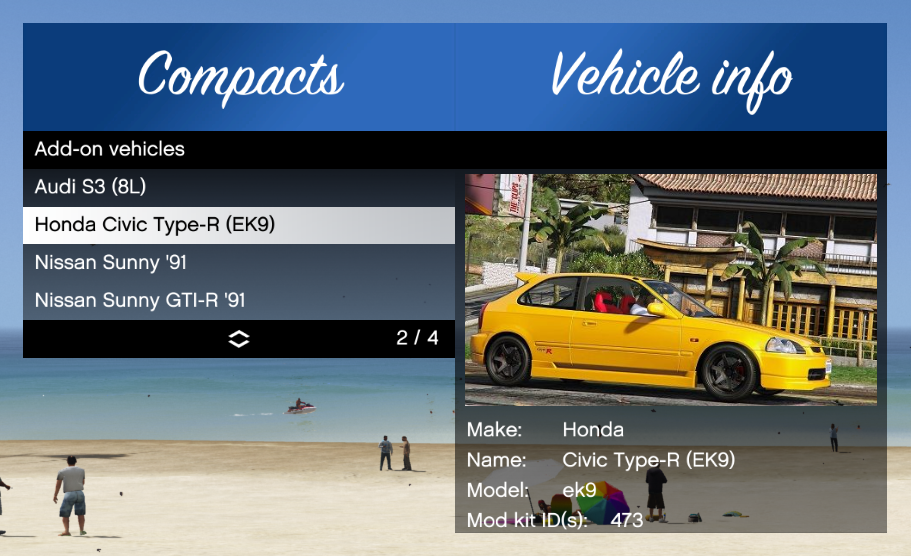
Add-on Spawner is a ScriptHookV script that automatically looks for add-on vehicles and puts them in a menu for you to spawn.
Features
Requirements
GTA V v1.0.877.1 or later
ScriptHookV
Installation
Drag and drop AddonSpawner.asi and the AddonSpawner folder to your GTA V game folder.
Usage
No configuration needed, just load it up, press the hotkey (F5) and spawn your add-on vehicle. They are separated by vehicle class. It only lists your add-on vehicles, so no base game/DLC vehicles. There are various options for sorting vanilla cars and add-ons, so check the settings.
To add images, put an image file (.jpg or .png) in the AddonSpawner/img folder, with the model name (spawn name) as file name. For example: ek9.jpg.
Credits
Full credits to the ScriptHookVDotNet team on this one.
This wouldn't have been possible without Unknown Modder and drp4lyf!
Source
GitHub
Changelog
1.6.2
* Update menu for Enhanced record global
* Update menu for hotkey falsely triggering on camera switch
* Support MP vehicles for Enhanced (thanks, Chiheb-Bacha!)
* Support modkit ID for Enhanced
1.6.1
* Update vehicles for A Safehouse in the Hills
Note: Still no Enhanced support for DLC vehicles.
1.6.0
* Support Enhanced (thanks to avail!)
* Update vehicles for Money Fronts (Legacy 1.0.3570.0, Enhanced 1.0.889.15)
NOTE
Enhanced support is still basic for just vehicle detection. The following applies for Enhanced:
Modkit IDs are not read
Enabling of GTA: Online vehicles functionality has not been updated. Use Simple Trainer, that one does allow GTA: Online vehicles to stay in SP.
The old noimage.png included in older releases (<= 1.5.8) does not load on Enhanced. It will be automatically updated on first start if only AddonSpawner.asi is replaced as part of the update.
1.5.8
* Update vehicles for 1.0.3411.0 (Agents of Sabotage)
1.5.7
* Update vehicles for 1.0.3258.0 (Bottom Dollar Bounties)
* Fix menu scrolling overlay on gamepad, thanks to alloc8or!
1.5.6
* Update vehicles for b3095 (The Chop Shop)
1.5.5
* Update vehicles for b2944 (San Andreas Mercenaries)
1.5.4
* Update despawn fix for b2802, entirely thanks to alexguirre!
* Update vehicles for b2802 (Los Santos Drug Wars)
1.5.3
* Display DLC name for vehicles from official DLC
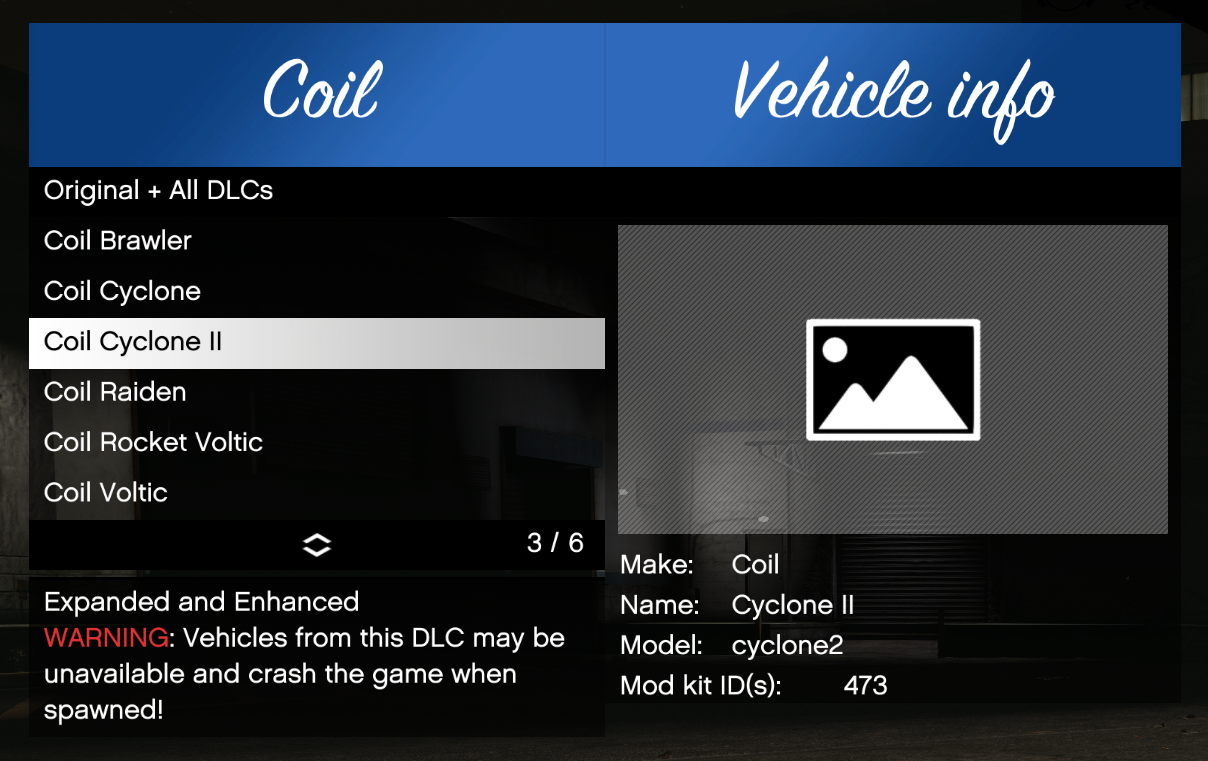
* Display warning for b2699 (The Criminal Enterprises) vehicles
Yes, they're still spawnable and WILL crash your game when spawned anyway. No, I'm not filtering them out for the off-chance someone puts working files for these models, or for the off-chance of R* adding them in a future update. There's a fat warning now, spawning them is now completely at your own risk.
Note: There was a small time window of 40 minutes where a faulty version was uploaded, apologies for that. It is unpublished now, only the hotfix version is available.
Hotfix changes:
* Fix missing return path in DLC filtering (undefined behavior)
* Update menu dependency
1.5.2
* Update vehicles for b2612 (Expanded and Enhanced) (Spawning them will crash the game, but at least they're filtered away now)
* Update vehicles for b2699 (The Criminal Enterprises)
1.5.1
* Update vehicles for b2545 (The Contract)
* Fix non-DLC content added each load when no addons present
1.5.0
* List and sort spawn list by manufacturer before model
* Load images on start instead of on selection
1.4.5
Thank you fingaweg for making this fast update possible!
* Update vehicles for b2372 (Los Santos Tuners)
* Fix re-initialization problems
* Improve image loading (support .webp)
Old changelogs
Features
- Detects added vehicles automatically
- Search by make, model or name
- Various spawn options
- Various sorting options
- Custom thumbnails
- Prevents DLC vehicles from de-spawning
Requirements
GTA V v1.0.877.1 or later
ScriptHookV
Installation
Drag and drop AddonSpawner.asi and the AddonSpawner folder to your GTA V game folder.
Usage
No configuration needed, just load it up, press the hotkey (F5) and spawn your add-on vehicle. They are separated by vehicle class. It only lists your add-on vehicles, so no base game/DLC vehicles. There are various options for sorting vanilla cars and add-ons, so check the settings.
To add images, put an image file (.jpg or .png) in the AddonSpawner/img folder, with the model name (spawn name) as file name. For example: ek9.jpg.
Credits
Full credits to the ScriptHookVDotNet team on this one.
This wouldn't have been possible without Unknown Modder and drp4lyf!
Source
GitHub
Changelog
1.6.2
* Update menu for Enhanced record global
* Update menu for hotkey falsely triggering on camera switch
* Support MP vehicles for Enhanced (thanks, Chiheb-Bacha!)
* Support modkit ID for Enhanced
1.6.1
* Update vehicles for A Safehouse in the Hills
Note: Still no Enhanced support for DLC vehicles.
1.6.0
* Support Enhanced (thanks to avail!)
* Update vehicles for Money Fronts (Legacy 1.0.3570.0, Enhanced 1.0.889.15)
NOTE
Enhanced support is still basic for just vehicle detection. The following applies for Enhanced:
Modkit IDs are not read
Enabling of GTA: Online vehicles functionality has not been updated. Use Simple Trainer, that one does allow GTA: Online vehicles to stay in SP.
The old noimage.png included in older releases (<= 1.5.8) does not load on Enhanced. It will be automatically updated on first start if only AddonSpawner.asi is replaced as part of the update.
1.5.8
* Update vehicles for 1.0.3411.0 (Agents of Sabotage)
1.5.7
* Update vehicles for 1.0.3258.0 (Bottom Dollar Bounties)
* Fix menu scrolling overlay on gamepad, thanks to alloc8or!
1.5.6
* Update vehicles for b3095 (The Chop Shop)
1.5.5
* Update vehicles for b2944 (San Andreas Mercenaries)
1.5.4
* Update despawn fix for b2802, entirely thanks to alexguirre!
* Update vehicles for b2802 (Los Santos Drug Wars)
1.5.3
* Display DLC name for vehicles from official DLC
* Display warning for b2699 (The Criminal Enterprises) vehicles
Yes, they're still spawnable and WILL crash your game when spawned anyway. No, I'm not filtering them out for the off-chance someone puts working files for these models, or for the off-chance of R* adding them in a future update. There's a fat warning now, spawning them is now completely at your own risk.
Note: There was a small time window of 40 minutes where a faulty version was uploaded, apologies for that. It is unpublished now, only the hotfix version is available.
Hotfix changes:
* Fix missing return path in DLC filtering (undefined behavior)
* Update menu dependency
1.5.2
* Update vehicles for b2612 (Expanded and Enhanced) (Spawning them will crash the game, but at least they're filtered away now)
* Update vehicles for b2699 (The Criminal Enterprises)
1.5.1
* Update vehicles for b2545 (The Contract)
* Fix non-DLC content added each load when no addons present
1.5.0
* List and sort spawn list by manufacturer before model
* Load images on start instead of on selection
1.4.5
Thank you fingaweg for making this fast update possible!
* Update vehicles for b2372 (Los Santos Tuners)
* Fix re-initialization problems
* Improve image loading (support .webp)
Old changelogs
Carregat per primera vegada: 30 de Abril de 2017
Actualització més recent: 22 de Març de 2026
Últim descarregat: fa 2 minuts
1.576 Comentaris
More mods by ikt:
Add-on Spawner is a ScriptHookV script that automatically looks for add-on vehicles and puts them in a menu for you to spawn.
Features
Requirements
GTA V v1.0.877.1 or later
ScriptHookV
Installation
Drag and drop AddonSpawner.asi and the AddonSpawner folder to your GTA V game folder.
Usage
No configuration needed, just load it up, press the hotkey (F5) and spawn your add-on vehicle. They are separated by vehicle class. It only lists your add-on vehicles, so no base game/DLC vehicles. There are various options for sorting vanilla cars and add-ons, so check the settings.
To add images, put an image file (.jpg or .png) in the AddonSpawner/img folder, with the model name (spawn name) as file name. For example: ek9.jpg.
Credits
Full credits to the ScriptHookVDotNet team on this one.
This wouldn't have been possible without Unknown Modder and drp4lyf!
Source
GitHub
Changelog
1.6.2
* Update menu for Enhanced record global
* Update menu for hotkey falsely triggering on camera switch
* Support MP vehicles for Enhanced (thanks, Chiheb-Bacha!)
* Support modkit ID for Enhanced
1.6.1
* Update vehicles for A Safehouse in the Hills
Note: Still no Enhanced support for DLC vehicles.
1.6.0
* Support Enhanced (thanks to avail!)
* Update vehicles for Money Fronts (Legacy 1.0.3570.0, Enhanced 1.0.889.15)
NOTE
Enhanced support is still basic for just vehicle detection. The following applies for Enhanced:
Modkit IDs are not read
Enabling of GTA: Online vehicles functionality has not been updated. Use Simple Trainer, that one does allow GTA: Online vehicles to stay in SP.
The old noimage.png included in older releases (<= 1.5.8) does not load on Enhanced. It will be automatically updated on first start if only AddonSpawner.asi is replaced as part of the update.
1.5.8
* Update vehicles for 1.0.3411.0 (Agents of Sabotage)
1.5.7
* Update vehicles for 1.0.3258.0 (Bottom Dollar Bounties)
* Fix menu scrolling overlay on gamepad, thanks to alloc8or!
1.5.6
* Update vehicles for b3095 (The Chop Shop)
1.5.5
* Update vehicles for b2944 (San Andreas Mercenaries)
1.5.4
* Update despawn fix for b2802, entirely thanks to alexguirre!
* Update vehicles for b2802 (Los Santos Drug Wars)
1.5.3
* Display DLC name for vehicles from official DLC
* Display warning for b2699 (The Criminal Enterprises) vehicles
Yes, they're still spawnable and WILL crash your game when spawned anyway. No, I'm not filtering them out for the off-chance someone puts working files for these models, or for the off-chance of R* adding them in a future update. There's a fat warning now, spawning them is now completely at your own risk.
Note: There was a small time window of 40 minutes where a faulty version was uploaded, apologies for that. It is unpublished now, only the hotfix version is available.
Hotfix changes:
* Fix missing return path in DLC filtering (undefined behavior)
* Update menu dependency
1.5.2
* Update vehicles for b2612 (Expanded and Enhanced) (Spawning them will crash the game, but at least they're filtered away now)
* Update vehicles for b2699 (The Criminal Enterprises)
1.5.1
* Update vehicles for b2545 (The Contract)
* Fix non-DLC content added each load when no addons present
1.5.0
* List and sort spawn list by manufacturer before model
* Load images on start instead of on selection
1.4.5
Thank you fingaweg for making this fast update possible!
* Update vehicles for b2372 (Los Santos Tuners)
* Fix re-initialization problems
* Improve image loading (support .webp)
Old changelogs
Features
- Detects added vehicles automatically
- Search by make, model or name
- Various spawn options
- Various sorting options
- Custom thumbnails
- Prevents DLC vehicles from de-spawning
Requirements
GTA V v1.0.877.1 or later
ScriptHookV
Installation
Drag and drop AddonSpawner.asi and the AddonSpawner folder to your GTA V game folder.
Usage
No configuration needed, just load it up, press the hotkey (F5) and spawn your add-on vehicle. They are separated by vehicle class. It only lists your add-on vehicles, so no base game/DLC vehicles. There are various options for sorting vanilla cars and add-ons, so check the settings.
To add images, put an image file (.jpg or .png) in the AddonSpawner/img folder, with the model name (spawn name) as file name. For example: ek9.jpg.
Credits
Full credits to the ScriptHookVDotNet team on this one.
This wouldn't have been possible without Unknown Modder and drp4lyf!
Source
GitHub
Changelog
1.6.2
* Update menu for Enhanced record global
* Update menu for hotkey falsely triggering on camera switch
* Support MP vehicles for Enhanced (thanks, Chiheb-Bacha!)
* Support modkit ID for Enhanced
1.6.1
* Update vehicles for A Safehouse in the Hills
Note: Still no Enhanced support for DLC vehicles.
1.6.0
* Support Enhanced (thanks to avail!)
* Update vehicles for Money Fronts (Legacy 1.0.3570.0, Enhanced 1.0.889.15)
NOTE
Enhanced support is still basic for just vehicle detection. The following applies for Enhanced:
Modkit IDs are not read
Enabling of GTA: Online vehicles functionality has not been updated. Use Simple Trainer, that one does allow GTA: Online vehicles to stay in SP.
The old noimage.png included in older releases (<= 1.5.8) does not load on Enhanced. It will be automatically updated on first start if only AddonSpawner.asi is replaced as part of the update.
1.5.8
* Update vehicles for 1.0.3411.0 (Agents of Sabotage)
1.5.7
* Update vehicles for 1.0.3258.0 (Bottom Dollar Bounties)
* Fix menu scrolling overlay on gamepad, thanks to alloc8or!
1.5.6
* Update vehicles for b3095 (The Chop Shop)
1.5.5
* Update vehicles for b2944 (San Andreas Mercenaries)
1.5.4
* Update despawn fix for b2802, entirely thanks to alexguirre!
* Update vehicles for b2802 (Los Santos Drug Wars)
1.5.3
* Display DLC name for vehicles from official DLC
* Display warning for b2699 (The Criminal Enterprises) vehicles
Yes, they're still spawnable and WILL crash your game when spawned anyway. No, I'm not filtering them out for the off-chance someone puts working files for these models, or for the off-chance of R* adding them in a future update. There's a fat warning now, spawning them is now completely at your own risk.
Note: There was a small time window of 40 minutes where a faulty version was uploaded, apologies for that. It is unpublished now, only the hotfix version is available.
Hotfix changes:
* Fix missing return path in DLC filtering (undefined behavior)
* Update menu dependency
1.5.2
* Update vehicles for b2612 (Expanded and Enhanced) (Spawning them will crash the game, but at least they're filtered away now)
* Update vehicles for b2699 (The Criminal Enterprises)
1.5.1
* Update vehicles for b2545 (The Contract)
* Fix non-DLC content added each load when no addons present
1.5.0
* List and sort spawn list by manufacturer before model
* Load images on start instead of on selection
1.4.5
Thank you fingaweg for making this fast update possible!
* Update vehicles for b2372 (Los Santos Tuners)
* Fix re-initialization problems
* Improve image loading (support .webp)
Old changelogs
Carregat per primera vegada: 30 de Abril de 2017
Actualització més recent: 22 de Març de 2026
Últim descarregat: fa 2 minuts
 5mods on Discord

Hi everyone. I've got a problem. The menu opens when I press V. I looked at the ini file and it specifies the F5 keys. Does anyone know how to solve this? Thanks in advance!
same problem here when i press v separate menus open including this one and handling editor since the update, sigh rockstar
The mod needs to be updated. After the recent GTA 5 update, pressing V always opens the menu.
Pressing V also opens the menu for me. Update is def needed
Please update, thank you!
Needs an update, whenever I hit the overlapping squares button controller or V key on keyboard it brings up the menu and my menu keybind is set to F12
Thank you for the update!
I don't understand why you added a "V" shortcut key. Do you think adding this extra feature is very convenient? But you overlooked the camera angle button
how to remove the v as a shortcut key? Bcs it's not in the settings menu
@Voltlegenda @2010prado
V was never a shortcut. The menu popping up in the latest update is because of the recent GTA V update that messes up some defaults I used for unmapped bindings. Update to 1.6.2, which has this issue resolved.
Thank you for your answer
How do I activate thr mod? or rather wich keys on the kaybourd do you use
@ikt - Why cant this spawner only show my DLC vehicles and leave the RS new vehicles out of that list. Even with this new update some RS vehicles are present in the list. Looks weird. Pls. fix.
@bmw740il The newest version should hide all official DLC from R*. It does need a manual update every time.
@ikt thanks
cant open the menu with f5 what to do?
bades mod ive seen and this is the second mod i wanted to use btw
i have a problem in 1.6.2 version but the version 1.6.1 works. but how to fix it.
@Hahash you can do 2 steps 1st one is reinstall means delete all mods and install. 2nd way is go to gta5 instalation file find addonspawner file open it and go settings_menu open it using notpade and edit menu key to f5 or f6 sometimes f6 works properly.
pls make a new update when I try to load in game It Works but then when i wont to add a Lambo It Says Error Loading ito game Pls Restart game and i do and it keeps saying same thing