Global Invest 1.8









65.796
543
65.796
543
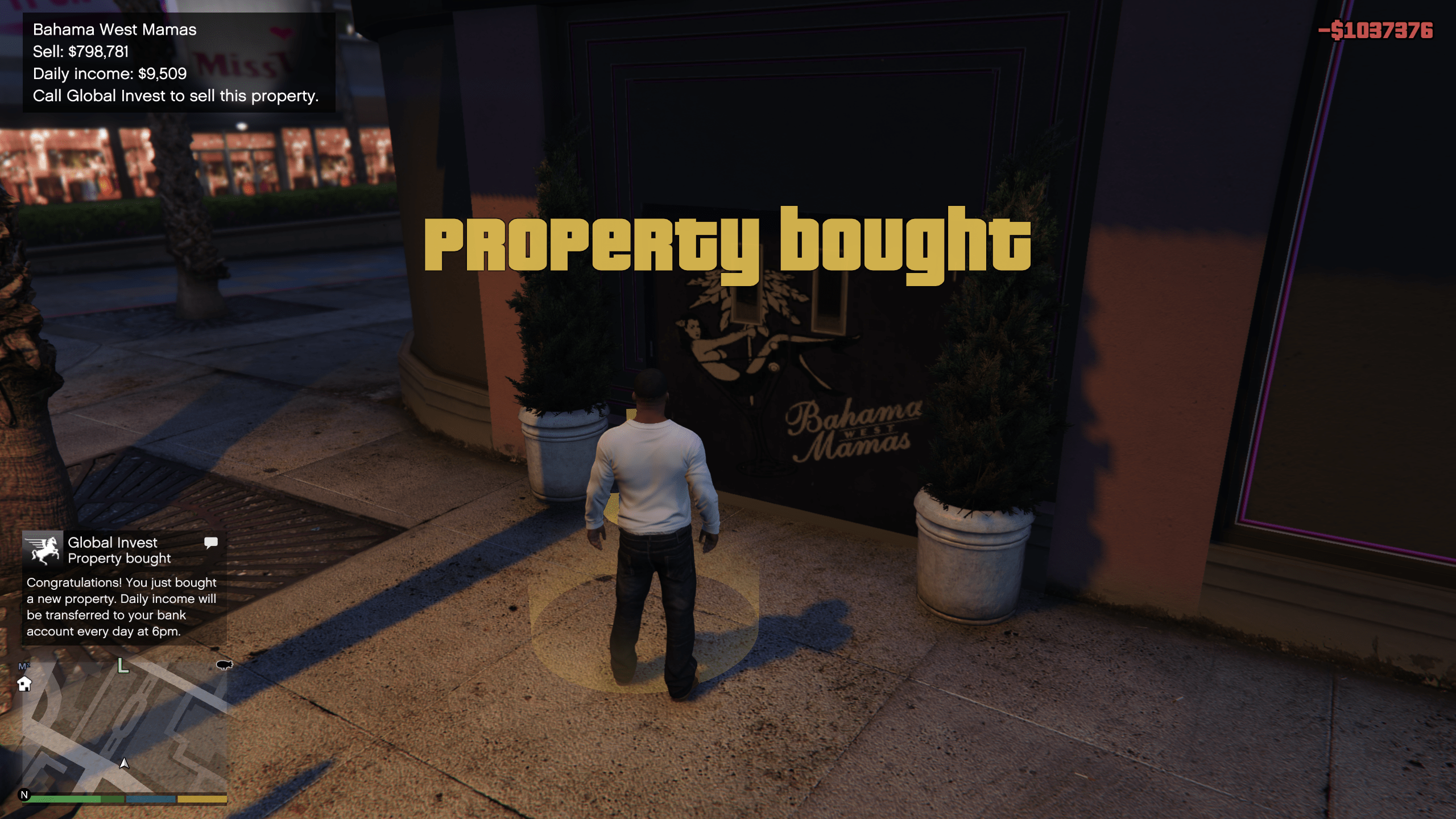
Global Invest is an international company that allows you to invest in a wide range of properties and businesses – from small venues to large enterprises. With Global Invest, you can become an investor, buy and manage properties, run marketing campaigns, and collect daily profits.
Main features:
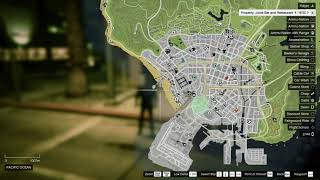
- Buy and sell properties displayed on the map (with customizable blip icons)
- Dynamic purchase, sale prices, and daily income affected by campaigns and events
- Separate property portfolios for each character (Michael, Franklin, Trevor)
- Contact "Global Invest" via the iFruit phone (dedicated contact)
- Create new properties and delete existing ones directly in-game
- Marketing campaign system (Basic, Standard, Premium) that influences property income
- Buyout offers and the ability to negotiate property sales
- Manual or automatic income collection (depending on settings)
- Advanced property management menus (overview, editing, campaigns, payouts)
- Full support for both gamepad and keyboard (customizable shortcuts)
Requirements:
- Microsoft .NET Framework 4.8
- Microsoft Visual C++ Redistributable Package
- Script Hook V
- latest ScriptHookVDotNet Nightly or Enhanced
- LemonUI SHVDN3 (v2.2)
- iFruitAddon2 (v3.1.1)
Installation:
- Drag and drop all .dll and .json files into your scripts folder
Q&A
Q: How to create custom property?
A: Press F10 (DPAD RIGHT + X), then enter the name, enter the price, and choose the blip icon.
Q: How to delete any property?
A: Press F11 (DPAD RIGHT + Y) to open the management, then find/select the property and delete it.
or
Press F11 (DPAD RIGHT + Y) when the player is standing in the property marker.
Q: How to turn off property blips?
A: Press F9 (DPAD LEFT + X) to toggle property blips on/off.
Changelog:
v1.8
- added a property import menu for migrating properties from the old .ini file format used by earlier versions of the mod
- the import menu is bound to F12 by default and can be changed in the config file
- only properties that are not already present in the current data set are shown for import, helping avoid duplicates
v1.7
- disabling blips now truly removes them instead of just hiding them
- migrated from .ini to json for easier data management
- unified the interface — all windows now follow a similar visual style
- added a new menu for managing all properties, bound to F11 by default
- improved the process of creating a new property
- rebuilt the marketing campaign system — there are now several options to choose from, all fully configurable
- added the ability to physically collect cash (ManualCollectionEnabled) — the player must personally visit the property to collect its income
ManualCollectionMaxIncomeMultiplier defines the maximum amount that can accumulate there (as a multiple of the property's DailyIncome)
- changed the default gamepad controls and added the ability to edit them in the config file
Supported gamepad button names:
DPADUP, DPADDOWN, DPADLEFT, DPADRIGHT
L3, LS, LEFTSTICK, LEFTANALOG, ANALOGL, LANALOG
R3, RS, RIGHTSTICK, RIGHTANALOG, ANALOGR, RANALOG
A, CROSS, B, CIRCLE, X, SQUARE, Y, TRIANGLE
LB, L1, RB, R1
LT, L2, RT, R2
v1.6
- most of the code has been rewritten
- fixed bugs causing the script to crash
- improved the daily income payout mechanism (double payouts or missing payouts)
- fixed several minor bugs
- minor improvements to notifications
- migrated to a newer version of iFruitAddon2
v1.5
- changing property blips does not change its name
- added gamepad support
- small UI fixes
- script compatible with the latest LemonUI
Main features:
- Buy and sell properties displayed on the map (with customizable blip icons)
- Dynamic purchase, sale prices, and daily income affected by campaigns and events
- Separate property portfolios for each character (Michael, Franklin, Trevor)
- Contact "Global Invest" via the iFruit phone (dedicated contact)
- Create new properties and delete existing ones directly in-game
- Marketing campaign system (Basic, Standard, Premium) that influences property income
- Buyout offers and the ability to negotiate property sales
- Manual or automatic income collection (depending on settings)
- Advanced property management menus (overview, editing, campaigns, payouts)
- Full support for both gamepad and keyboard (customizable shortcuts)
Requirements:
- Microsoft .NET Framework 4.8
- Microsoft Visual C++ Redistributable Package
- Script Hook V
- latest ScriptHookVDotNet Nightly or Enhanced
- LemonUI SHVDN3 (v2.2)
- iFruitAddon2 (v3.1.1)
Installation:
- Drag and drop all .dll and .json files into your scripts folder
Q&A
Q: How to create custom property?
A: Press F10 (DPAD RIGHT + X), then enter the name, enter the price, and choose the blip icon.
Q: How to delete any property?
A: Press F11 (DPAD RIGHT + Y) to open the management, then find/select the property and delete it.
or
Press F11 (DPAD RIGHT + Y) when the player is standing in the property marker.
Q: How to turn off property blips?
A: Press F9 (DPAD LEFT + X) to toggle property blips on/off.
Changelog:
v1.8
- added a property import menu for migrating properties from the old .ini file format used by earlier versions of the mod
- the import menu is bound to F12 by default and can be changed in the config file
- only properties that are not already present in the current data set are shown for import, helping avoid duplicates
v1.7
- disabling blips now truly removes them instead of just hiding them
- migrated from .ini to json for easier data management
- unified the interface — all windows now follow a similar visual style
- added a new menu for managing all properties, bound to F11 by default
- improved the process of creating a new property
- rebuilt the marketing campaign system — there are now several options to choose from, all fully configurable
- added the ability to physically collect cash (ManualCollectionEnabled) — the player must personally visit the property to collect its income
ManualCollectionMaxIncomeMultiplier defines the maximum amount that can accumulate there (as a multiple of the property's DailyIncome)
- changed the default gamepad controls and added the ability to edit them in the config file
Supported gamepad button names:
DPADUP, DPADDOWN, DPADLEFT, DPADRIGHT
L3, LS, LEFTSTICK, LEFTANALOG, ANALOGL, LANALOG
R3, RS, RIGHTSTICK, RIGHTANALOG, ANALOGR, RANALOG
A, CROSS, B, CIRCLE, X, SQUARE, Y, TRIANGLE
LB, L1, RB, R1
LT, L2, RT, R2
v1.6
- most of the code has been rewritten
- fixed bugs causing the script to crash
- improved the daily income payout mechanism (double payouts or missing payouts)
- fixed several minor bugs
- minor improvements to notifications
- migrated to a newer version of iFruitAddon2
v1.5
- changing property blips does not change its name
- added gamepad support
- small UI fixes
- script compatible with the latest LemonUI
Carregat per primera vegada: 30 de Maig de 2020
Actualització més recent: 07 de Abril de 2026
Últim descarregat: fa 21 minuts
All Versions
284 Comentaris
More mods by fet0r:
Global Invest is an international company that allows you to invest in a wide range of properties and businesses – from small venues to large enterprises. With Global Invest, you can become an investor, buy and manage properties, run marketing campaigns, and collect daily profits.
Main features:
- Buy and sell properties displayed on the map (with customizable blip icons)
- Dynamic purchase, sale prices, and daily income affected by campaigns and events
- Separate property portfolios for each character (Michael, Franklin, Trevor)
- Contact "Global Invest" via the iFruit phone (dedicated contact)
- Create new properties and delete existing ones directly in-game
- Marketing campaign system (Basic, Standard, Premium) that influences property income
- Buyout offers and the ability to negotiate property sales
- Manual or automatic income collection (depending on settings)
- Advanced property management menus (overview, editing, campaigns, payouts)
- Full support for both gamepad and keyboard (customizable shortcuts)
Requirements:
- Microsoft .NET Framework 4.8
- Microsoft Visual C++ Redistributable Package
- Script Hook V
- latest ScriptHookVDotNet Nightly or Enhanced
- LemonUI SHVDN3 (v2.2)
- iFruitAddon2 (v3.1.1)
Installation:
- Drag and drop all .dll and .json files into your scripts folder
Q&A
Q: How to create custom property?
A: Press F10 (DPAD RIGHT + X), then enter the name, enter the price, and choose the blip icon.
Q: How to delete any property?
A: Press F11 (DPAD RIGHT + Y) to open the management, then find/select the property and delete it.
or
Press F11 (DPAD RIGHT + Y) when the player is standing in the property marker.
Q: How to turn off property blips?
A: Press F9 (DPAD LEFT + X) to toggle property blips on/off.
Changelog:
v1.8
- added a property import menu for migrating properties from the old .ini file format used by earlier versions of the mod
- the import menu is bound to F12 by default and can be changed in the config file
- only properties that are not already present in the current data set are shown for import, helping avoid duplicates
v1.7
- disabling blips now truly removes them instead of just hiding them
- migrated from .ini to json for easier data management
- unified the interface — all windows now follow a similar visual style
- added a new menu for managing all properties, bound to F11 by default
- improved the process of creating a new property
- rebuilt the marketing campaign system — there are now several options to choose from, all fully configurable
- added the ability to physically collect cash (ManualCollectionEnabled) — the player must personally visit the property to collect its income
ManualCollectionMaxIncomeMultiplier defines the maximum amount that can accumulate there (as a multiple of the property's DailyIncome)
- changed the default gamepad controls and added the ability to edit them in the config file
Supported gamepad button names:
DPADUP, DPADDOWN, DPADLEFT, DPADRIGHT
L3, LS, LEFTSTICK, LEFTANALOG, ANALOGL, LANALOG
R3, RS, RIGHTSTICK, RIGHTANALOG, ANALOGR, RANALOG
A, CROSS, B, CIRCLE, X, SQUARE, Y, TRIANGLE
LB, L1, RB, R1
LT, L2, RT, R2
v1.6
- most of the code has been rewritten
- fixed bugs causing the script to crash
- improved the daily income payout mechanism (double payouts or missing payouts)
- fixed several minor bugs
- minor improvements to notifications
- migrated to a newer version of iFruitAddon2
v1.5
- changing property blips does not change its name
- added gamepad support
- small UI fixes
- script compatible with the latest LemonUI
Main features:
- Buy and sell properties displayed on the map (with customizable blip icons)
- Dynamic purchase, sale prices, and daily income affected by campaigns and events
- Separate property portfolios for each character (Michael, Franklin, Trevor)
- Contact "Global Invest" via the iFruit phone (dedicated contact)
- Create new properties and delete existing ones directly in-game
- Marketing campaign system (Basic, Standard, Premium) that influences property income
- Buyout offers and the ability to negotiate property sales
- Manual or automatic income collection (depending on settings)
- Advanced property management menus (overview, editing, campaigns, payouts)
- Full support for both gamepad and keyboard (customizable shortcuts)
Requirements:
- Microsoft .NET Framework 4.8
- Microsoft Visual C++ Redistributable Package
- Script Hook V
- latest ScriptHookVDotNet Nightly or Enhanced
- LemonUI SHVDN3 (v2.2)
- iFruitAddon2 (v3.1.1)
Installation:
- Drag and drop all .dll and .json files into your scripts folder
Q&A
Q: How to create custom property?
A: Press F10 (DPAD RIGHT + X), then enter the name, enter the price, and choose the blip icon.
Q: How to delete any property?
A: Press F11 (DPAD RIGHT + Y) to open the management, then find/select the property and delete it.
or
Press F11 (DPAD RIGHT + Y) when the player is standing in the property marker.
Q: How to turn off property blips?
A: Press F9 (DPAD LEFT + X) to toggle property blips on/off.
Changelog:
v1.8
- added a property import menu for migrating properties from the old .ini file format used by earlier versions of the mod
- the import menu is bound to F12 by default and can be changed in the config file
- only properties that are not already present in the current data set are shown for import, helping avoid duplicates
v1.7
- disabling blips now truly removes them instead of just hiding them
- migrated from .ini to json for easier data management
- unified the interface — all windows now follow a similar visual style
- added a new menu for managing all properties, bound to F11 by default
- improved the process of creating a new property
- rebuilt the marketing campaign system — there are now several options to choose from, all fully configurable
- added the ability to physically collect cash (ManualCollectionEnabled) — the player must personally visit the property to collect its income
ManualCollectionMaxIncomeMultiplier defines the maximum amount that can accumulate there (as a multiple of the property's DailyIncome)
- changed the default gamepad controls and added the ability to edit them in the config file
Supported gamepad button names:
DPADUP, DPADDOWN, DPADLEFT, DPADRIGHT
L3, LS, LEFTSTICK, LEFTANALOG, ANALOGL, LANALOG
R3, RS, RIGHTSTICK, RIGHTANALOG, ANALOGR, RANALOG
A, CROSS, B, CIRCLE, X, SQUARE, Y, TRIANGLE
LB, L1, RB, R1
LT, L2, RT, R2
v1.6
- most of the code has been rewritten
- fixed bugs causing the script to crash
- improved the daily income payout mechanism (double payouts or missing payouts)
- fixed several minor bugs
- minor improvements to notifications
- migrated to a newer version of iFruitAddon2
v1.5
- changing property blips does not change its name
- added gamepad support
- small UI fixes
- script compatible with the latest LemonUI
Carregat per primera vegada: 30 de Maig de 2020
Actualització més recent: 07 de Abril de 2026
Últim descarregat: fa 21 minuts
 5mods on Discord

@Proffessional2176rus sure
@fet0r How do I set up in-person cash pickup?
@Pawlo224 set ManualCollectionEnabled = true in GlobalInvest.json file
@fet0r thanks
@Proffessional2176rus Check the update.
safe to update from previous versions?
@fet0r thank you ,good
good mod
@fet0r Question: Is it difficult to implement a mod like spa II for houses, apartments, and garages?
@Proffessional2176rus yes
thx fr this mod
I tried for a straight hour i have all the requirements except Microsoft .NET Framework 4.8,Microsoft Visual C++ and the Redistributable Package all the tutorials i saw onlion didn't list them as requirement so i didn't think they were all that needed i could be wrong but i need some hep
Everything works fine but i don't got the Global Invest contact in my phone so i can't purchase anything. My Ls life and SPA II contacts are working so i don't know what's wrong, i have all the requiremenets. Could someone please help
@fet0r - I noticed If I edit the json to change the HOTKEYS and reload it automatically replaces them again with the defaults. Can you please fix this. its very annoying. Also this is on the Enhanced version not sure if that matters or not. Everything else works great thanks.
Is there any way to use modifier keybinds on keyboard? Like Shift+I for example. I love the mod, but I can't really afford to give up four keys with my modlist
I've downloaded the mod and all of it's requirements as listed, the blips show up and menus all work fine however the contact for Global Invest isn't appearing in my phone.
@fet0r @polski48_
I figured out the issue, it is with ifruitaddon2.
The way to fix it is by forcing iFruitAddon2 to refresh the contact list, you can do this by going into the config.ini and changing the 40 value to 41
[General]
StartIndex=40 ( change this to 41 )
Whilst I hate to make multiple comments, I have the mod fully working but it seems to be breaking in-game websites. Upon loading any site no matter what it is, it brings up the missing milk page.
@LaytonUK Yes i also found that on a GitHub page, i had LS Life and Global Invest on the same contact slot so when i was calling "Zee" from LS Life it was calling 2 contacts at once. But changing the startindex from 40 to 41 repaired it.
every requirements are correctly installed but not working (legacy) :(