Improved Grass Dithering 1.6



3.741
119
3.741
119
Information:
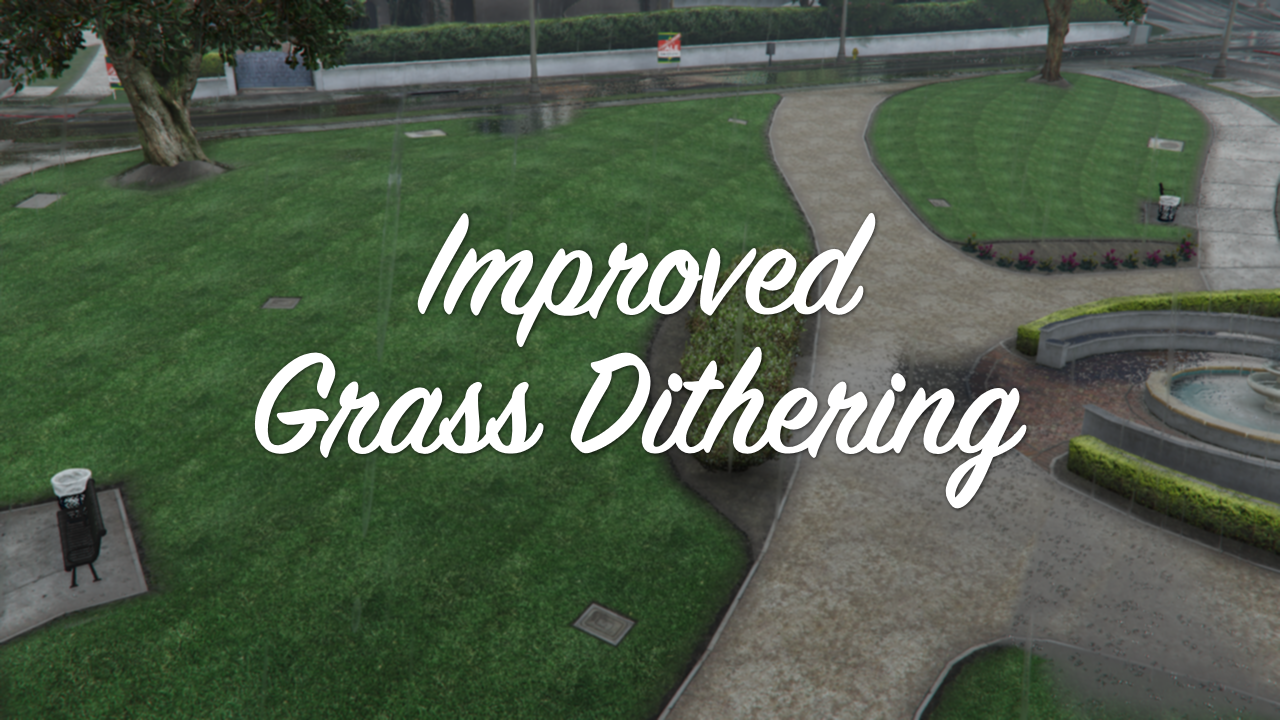
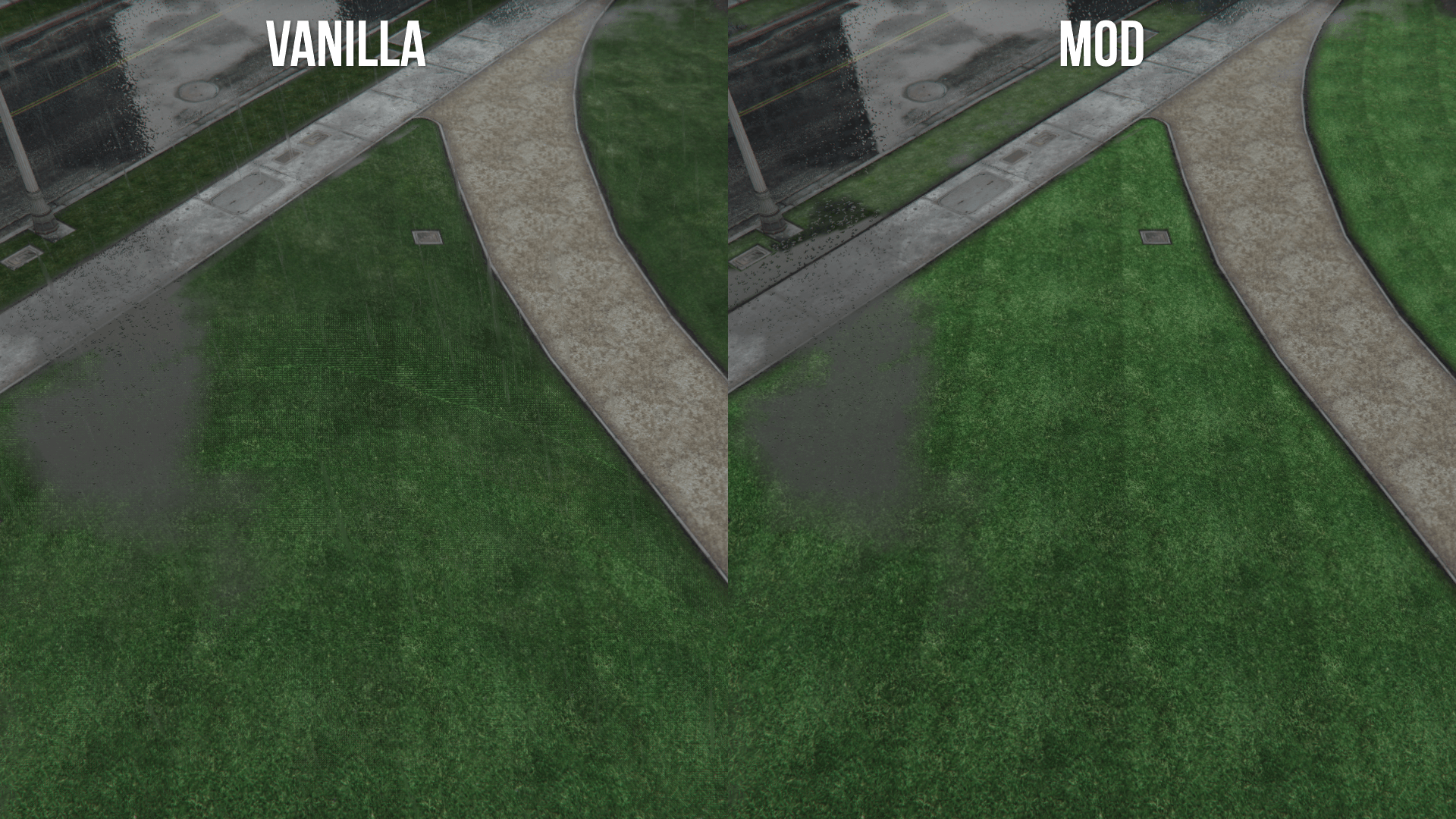
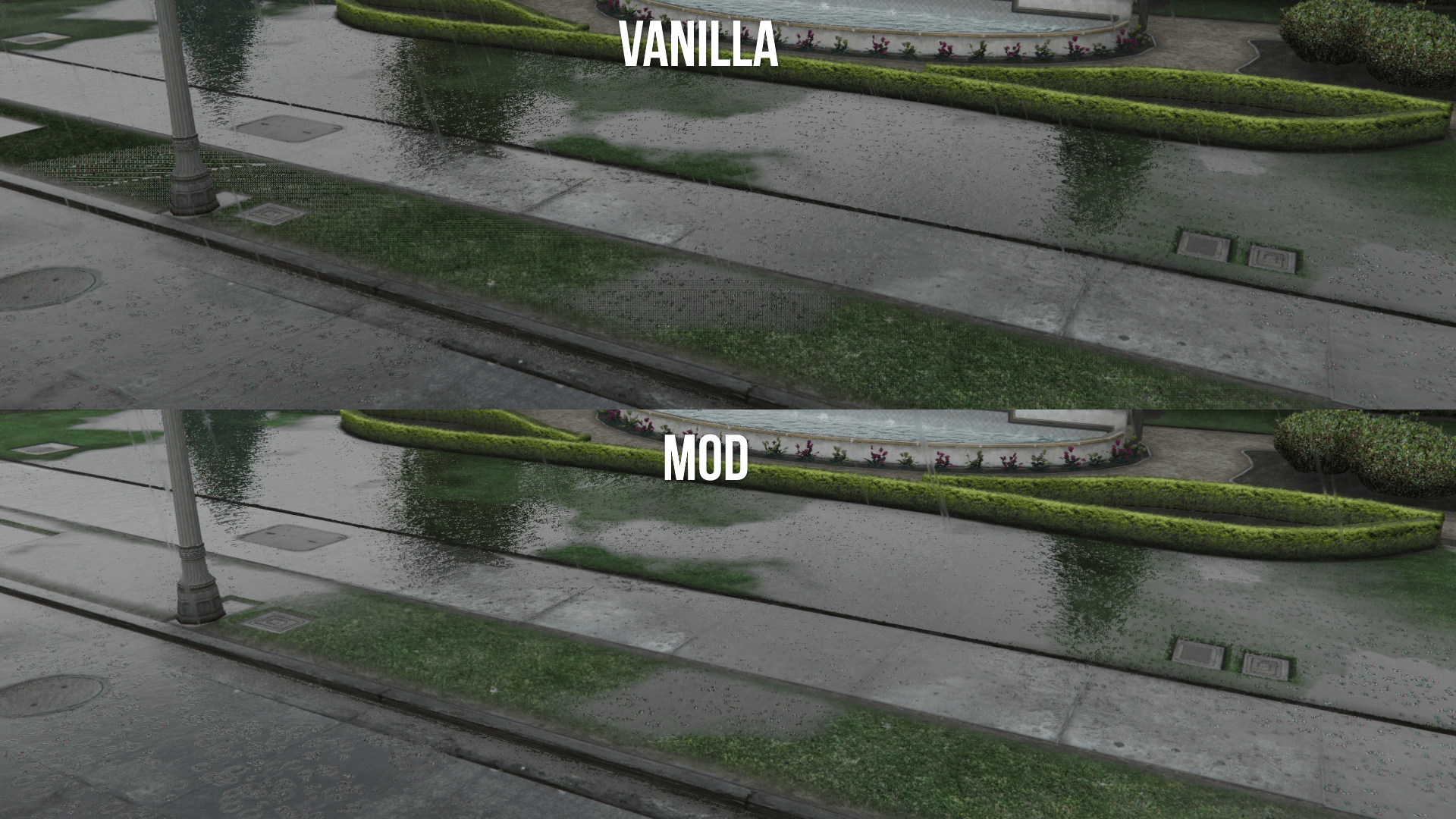
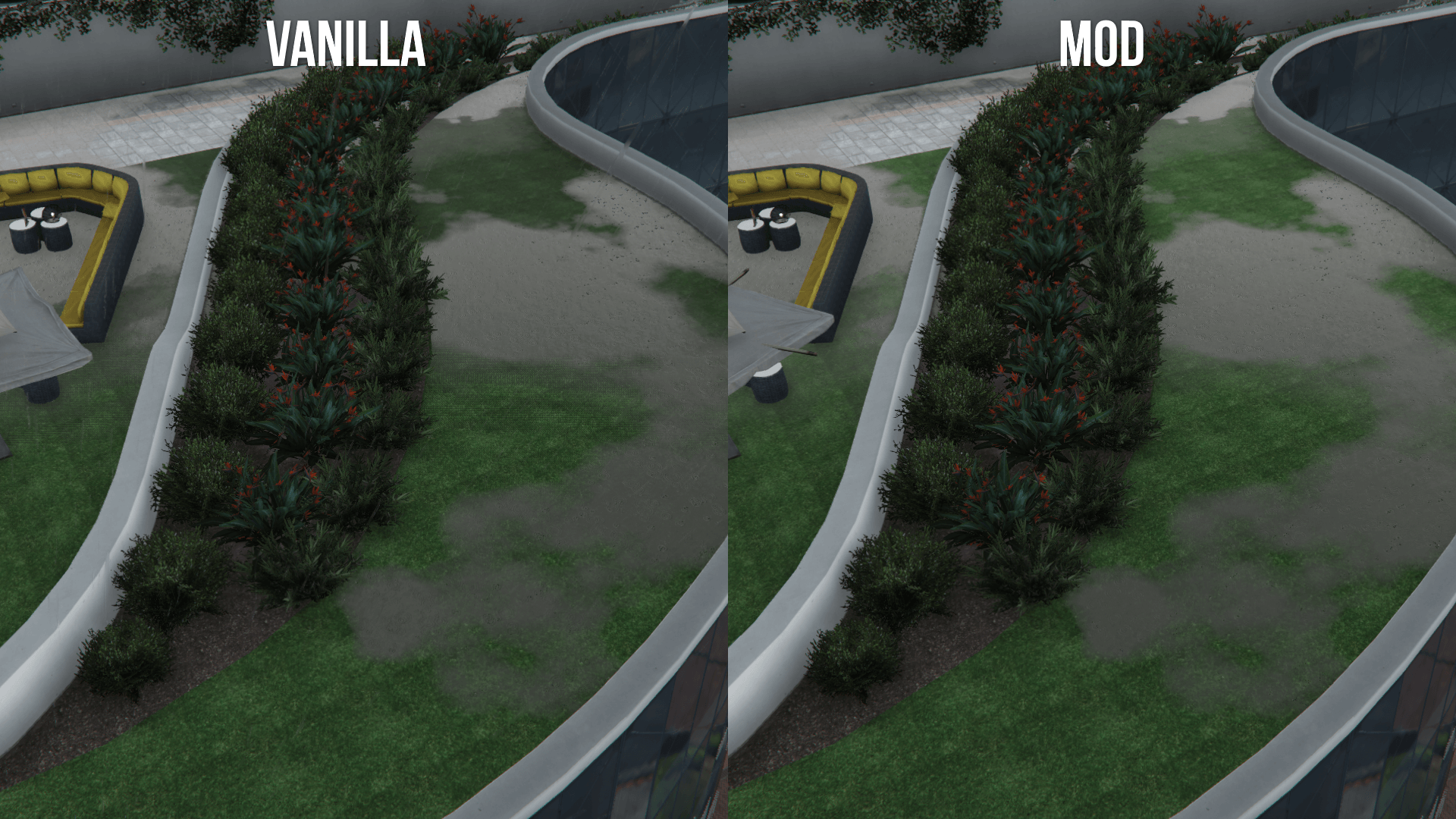
This mod replaces the dithering texture used for the fur grass
Requirements (Legacy):
- CodeWalker or OpenIV
- OpenIV.asi ( included with OpenIV )
- OIV Package Installer
Requirements (Enhanced):
- CodeWalker. Note: download the latest version from the Discord server
- OpenRPF
- OIV Package Installer
Installation (Legacy):
- Move the "spgrassstipple" folder in "mods\update\x64\dlcpacks"
- Add "<Item>dlcpacks:/spGrassStipple/</Item>" to the "dlclist.xml"
- Import "plantsmgr.ytd" in "mods\update\update.rpf\x64\textures"
- MP Map Files packs: use the OpenIV's built-in package installer / the OIV Package Installer or extract the files to import them manually
Installation (Enhanced):
- Move the "spGrassStipple_Gen9" folder in "mods\update\x64\dlcpacks"
- Add "<Item>dlcpacks:/spGrassStipple_Gen9/</Item>" to the "dlclist.xml"
- Import "plantsmgr.ytd" in "mods\update\update.rpf\x64\textures"
- MP Map Files packs: use the OIV Package Installer or extract the files to import them manually
Special Thanks:
- dexyfex for CodeWalker
- _CP_ for the original research on the dithering texture
Changelog:
v1.6
- Fixed a mispelled dlclist string in "ReadMe.txt". Thanks to SnakeVenom33939 for reporting the error
This mod replaces the dithering texture used for the fur grass
Requirements (Legacy):
- CodeWalker or OpenIV
- OpenIV.asi ( included with OpenIV )
- OIV Package Installer
Requirements (Enhanced):
- CodeWalker. Note: download the latest version from the Discord server
- OpenRPF
- OIV Package Installer
Installation (Legacy):
- Move the "spgrassstipple" folder in "mods\update\x64\dlcpacks"
- Add "<Item>dlcpacks:/spGrassStipple/</Item>" to the "dlclist.xml"
- Import "plantsmgr.ytd" in "mods\update\update.rpf\x64\textures"
- MP Map Files packs: use the OpenIV's built-in package installer / the OIV Package Installer or extract the files to import them manually
Installation (Enhanced):
- Move the "spGrassStipple_Gen9" folder in "mods\update\x64\dlcpacks"
- Add "<Item>dlcpacks:/spGrassStipple_Gen9/</Item>" to the "dlclist.xml"
- Import "plantsmgr.ytd" in "mods\update\update.rpf\x64\textures"
- MP Map Files packs: use the OIV Package Installer or extract the files to import them manually
Special Thanks:
- dexyfex for CodeWalker
- _CP_ for the original research on the dithering texture
Changelog:
v1.6
- Fixed a mispelled dlclist string in "ReadMe.txt". Thanks to SnakeVenom33939 for reporting the error
Carregat per primera vegada: 31 de Juliol de 2024
Actualització més recent: 23 de Març de 2026
Últim descarregat: Fa 3 hores
33 Comentaris
Information:
This mod replaces the dithering texture used for the fur grass
Requirements (Legacy):
- CodeWalker or OpenIV
- OpenIV.asi ( included with OpenIV )
- OIV Package Installer
Requirements (Enhanced):
- CodeWalker. Note: download the latest version from the Discord server
- OpenRPF
- OIV Package Installer
Installation (Legacy):
- Move the "spgrassstipple" folder in "mods\update\x64\dlcpacks"
- Add "<Item>dlcpacks:/spGrassStipple/</Item>" to the "dlclist.xml"
- Import "plantsmgr.ytd" in "mods\update\update.rpf\x64\textures"
- MP Map Files packs: use the OpenIV's built-in package installer / the OIV Package Installer or extract the files to import them manually
Installation (Enhanced):
- Move the "spGrassStipple_Gen9" folder in "mods\update\x64\dlcpacks"
- Add "<Item>dlcpacks:/spGrassStipple_Gen9/</Item>" to the "dlclist.xml"
- Import "plantsmgr.ytd" in "mods\update\update.rpf\x64\textures"
- MP Map Files packs: use the OIV Package Installer or extract the files to import them manually
Special Thanks:
- dexyfex for CodeWalker
- _CP_ for the original research on the dithering texture
Changelog:
v1.6
- Fixed a mispelled dlclist string in "ReadMe.txt". Thanks to SnakeVenom33939 for reporting the error
This mod replaces the dithering texture used for the fur grass
Requirements (Legacy):
- CodeWalker or OpenIV
- OpenIV.asi ( included with OpenIV )
- OIV Package Installer
Requirements (Enhanced):
- CodeWalker. Note: download the latest version from the Discord server
- OpenRPF
- OIV Package Installer
Installation (Legacy):
- Move the "spgrassstipple" folder in "mods\update\x64\dlcpacks"
- Add "<Item>dlcpacks:/spGrassStipple/</Item>" to the "dlclist.xml"
- Import "plantsmgr.ytd" in "mods\update\update.rpf\x64\textures"
- MP Map Files packs: use the OpenIV's built-in package installer / the OIV Package Installer or extract the files to import them manually
Installation (Enhanced):
- Move the "spGrassStipple_Gen9" folder in "mods\update\x64\dlcpacks"
- Add "<Item>dlcpacks:/spGrassStipple_Gen9/</Item>" to the "dlclist.xml"
- Import "plantsmgr.ytd" in "mods\update\update.rpf\x64\textures"
- MP Map Files packs: use the OIV Package Installer or extract the files to import them manually
Special Thanks:
- dexyfex for CodeWalker
- _CP_ for the original research on the dithering texture
Changelog:
v1.6
- Fixed a mispelled dlclist string in "ReadMe.txt". Thanks to SnakeVenom33939 for reporting the error
Carregat per primera vegada: 31 de Juliol de 2024
Actualització més recent: 23 de Març de 2026
Últim descarregat: Fa 3 hores
 5mods on Discord

@Alex106 Having an issue here which may be a mod conflict. A chunk of map doesn't load its lod with this mod enabled https://i.imgur.com/tdvy5ty.jpeg https://i.imgur.com/vR5heXI.jpeg
Is this something you've encountered at all?
Scratch that, nothing to do with this mod at all. My mistake
Can there be a FiveM version of this?
So I'm curious, what's the purpose of the original stipple texture to begin with? Surely it had to have some sort of benefit for Rockstar to use it.
@LIPDProductionsInc I don't use FiveM, I don't know how to set it up for it
@Jax765 It's used for the transition of the grass fur models
Very very very very nice mod, keep it brother!!! And thank you much for it.
Excellent work as always @Alex106. Thank you! :)
OMG YES!!! Thank you so much for this @Alex106 back in days I genuinely thought my gpu was dying
Great as always
good job i hope next vehicle far shadow fix
@Alex106 I noticed that you didn't included the "hei_ch3_12_vw_dlc_casino.ytd" in this new 1.3 version, do we still need to install that file as before or is it no longer needed for the "Legacy" version, I mean.
@JAM102970 That file is in the "mpgrassstipple" dlc pack
@Alex106 Sorry to ask you again about another question, I should've included it in the previous one but, I just forgot. The "plantsmgr.ytd", all this time I've being installing at \x64a.rpf\textures\ because that's where that file shows up in OpenIV search however in your installation instructions you instruct to install it at "mods\update\update.rpf\x64\textures\" but there's no "plantsmgr.ytd" there originally.
@JAM102970 The game will load the file from the update.rpf, as if Rockstar did it themselves (this goes for a bunch of other files as well). There's no need to copy x64a.rpf just for that
NICE!
Is this compatible with NVE (Enhacned)?
you know some this is Legendary GTA V legacy mod 💨💚
working perfectly on my old af GTA V install i haven't updated since 2019 lmao, nice work
Does changing the installation process provide some benefit other than the saving of RPF files, or is it just personal preference? Also, it's probably not even worth mentioning, but the readme has a misspelling. Obviously, I can figure it out on my own, but it's just for future reference for whenever you decide to update this mod lmao. Anyways, thanks for the great work!
- Add "<Item>dlcpacks:/msGrassStipple/</Item>" to the "dlclist.xml"
@SnakeVenom33939 I felt it's better to replace those specific files in the actual DLCs, despite the downside of having to copy GBs of archives.
Thanks for noticing that, I fixed it